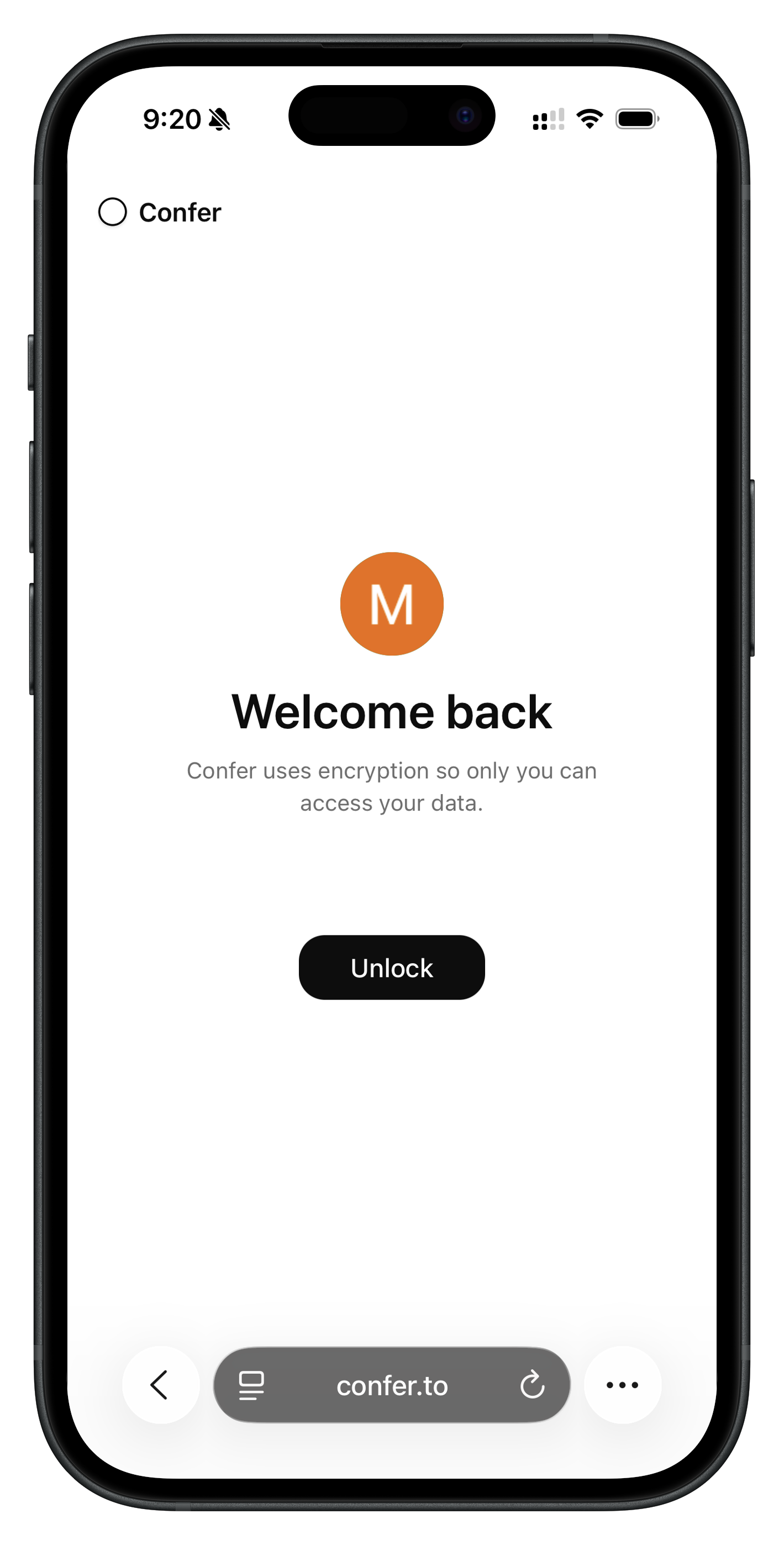
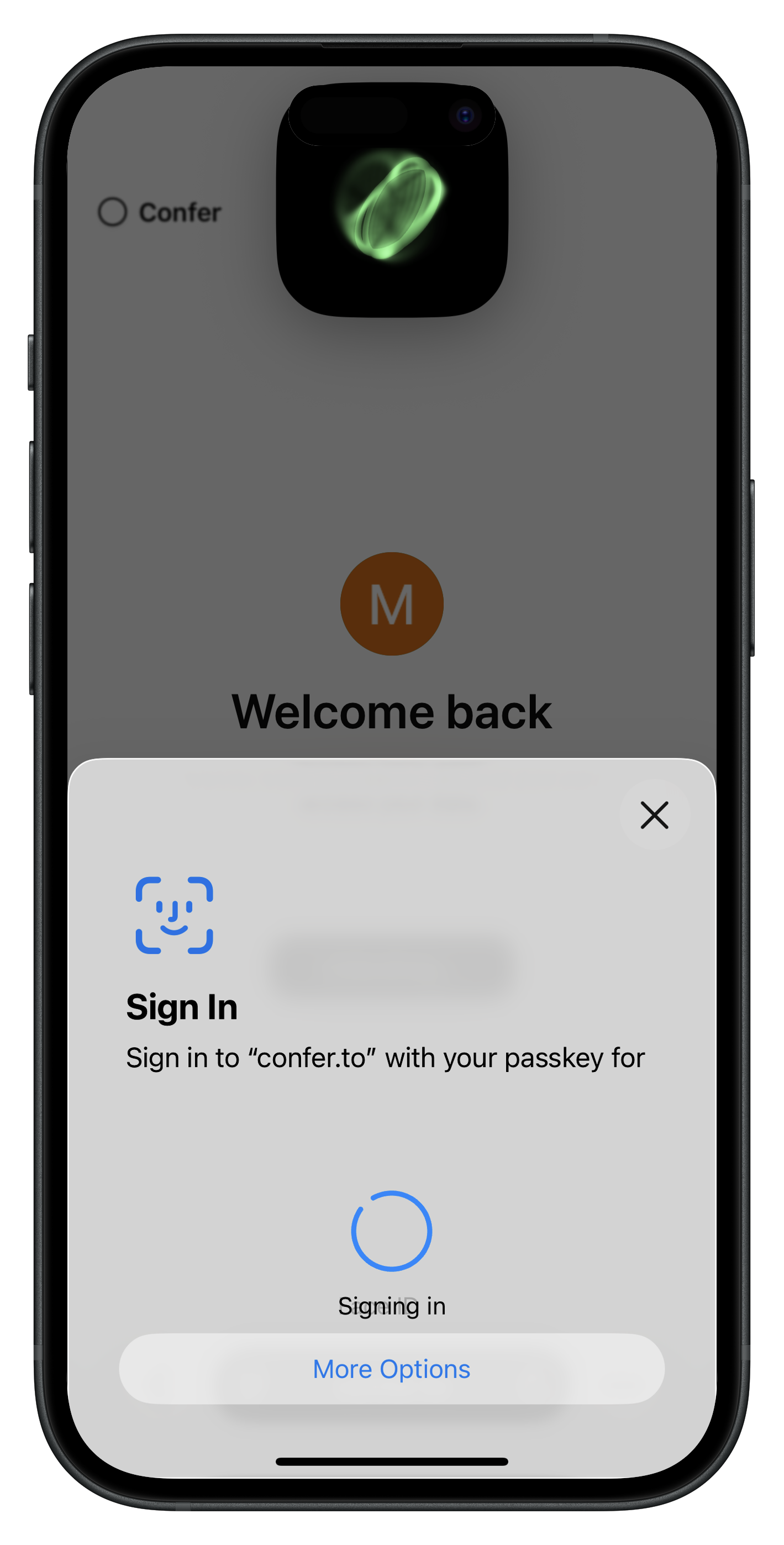
<?xml version="1.0" encoding="utf-8"?><feed xmlns="http://www.w3.org/2005/Atom" xml:lang="en"><generator uri="https://jekyllrb.com/" version="4.3.4">Jekyll</generator><link href="https://confer.to/blog/feed.xml" rel="self" type="application/atom+xml"/><link href="https://confer.to/blog/" rel="alternate" type="text/html" hreflang="en"/><updated>2026-09-05T09:32:48-07:00</updated><id>https://confer.to/blog/feed.xml</id><title type="html">Confer Blog</title><subtitle>First-hand engineering notes about private AI, end-to-end encryption, confidential computing, encrypted memory, and Confer.</subtitle><author><name>Moxie Marlinspike</name></author><entry><title type="html">Confidential workers for private AI</title><link href="https://confer.to/blog/2026/09/confidential-workers-for-private-ai/" rel="alternate" type="text/html" title="Confidential workers for private AI"/><published>2026-09-05T00:00:00-07:00</published><updated>2026-09-05T00:00:00-07:00</updated><id>https://confer.to/blog/2026/09/confidential-workers-for-private-ai</id><content type="html" xml:base="https://confer.to/blog/2026/09/confidential-workers-for-private-ai/"><![CDATA[<p>An AI assistant can answer a question with text, but doing useful work often requires a computer. Filling out a PDF, building a spreadsheet, editing an image, or turning a pile of notes into a presentation all require tools, files, and somewhere to run code.</p> <p>The usual solution is to give the model a sandbox on the AI company’s infrastructure. Your attachments are copied into it, the model’s commands run inside it, and the files it creates are copied back out. The sandbox may protect the rest of the service from the model, but it does not protect you from the service. The company operating the machine has full access to everything in it.</p> <p>We don’t want Confer to work that way. Our <a href="/blog/2026/01/private-inference/">private inference</a> and <a href="/blog/2025/12/passkey-encryption/">encryption</a> would not mean much if the model had to send your files and commands into an ordinary server whenever it needed to do something useful with them.</p> <p>That’s why we built confidential workers: private computers for the model to use that nobody else, including us, can access.</p> <h2 id="what-a-worker-can-do">What a worker can do</h2> <p>A confidential worker is a small Linux VM with an ordinary shell and a temporary workspace. It runs inside a Trusted Execution Environment (TEE) with encrypted memory, so the machine hosting it, and anyone operating that machine, cannot read what is inside. The model can write and run programs, copy an attachment into the workspace, inspect or modify it, and return a completed file to the conversation.</p> <p>The confidential worker image includes Python, PDF utilities, document libraries, and fonts. That is enough to do things like:</p> <ul> <li>Fill out or edit a PDF;</li> <li>Create a resume, report, or letter;</li> <li>Build a spreadsheet with formulas and charts;</li> <li>Produce a presentation;</li> <li>Transform images and other attachments;</li> <li>Analyze a dataset or run a calculation; and</li> <li>Generate almost any other file that can be made with code.</li> </ul> <p>The experience is intentionally unremarkable. You ask Confer to fill out a lease, it edits the attached PDF, and a completed PDF appears in the conversation. Underneath, the model used a real computer.</p> <h2 id="verifying-the-computer-before-using-it">Verifying the computer before using it</h2> <p>Your device never connects to a worker directly. The inference proxy does – the same attested TEE your device already verified before sending it your first message. As with <a href="/blog/2026/01/private-inference/">private inference</a>, an encrypted connection is only useful if the machine at the other end is actually confidential, so the proxy verifies each worker before sending it anything.</p> <p>Before connecting, the proxy creates a fresh random challenge and an ephemeral SSH client key. The confidential worker responds with:</p> <ul> <li>A hardware-signed attestation quote;</li> <li>Its ephemeral SSH host key;</li> <li>The challenge and client key it received;</li> <li>The signed manifest for its exact software release; and</li> <li>The release’s Sigstore inclusion bundle.</li> </ul> <p>The hardware quote cryptographically binds the challenge and both SSH keys to the running confidential VM. The proxy verifies the quote, verifies that the expected client and server keys are bound into it, verifies the release signature and transparency-log proof, and compares every measured value in the quote with the signed manifest.</p> <p>Only after all of those checks succeed does SSH begin. The proxy pins the host key from the quote and authenticates with the client key bound into the same quote. No command, attachment, or other user content is sent before verification.</p> <p>The rules the proxy uses to accept a worker – the release signing identity, and the requirement that every measurement match a signed release – are part of the proxy’s own measured image. When your device verifies the proxy, it is also verifying which workers that proxy will ever talk to.</p> <p>The <a href="https://github.com/conferlabs/confer-worker-image">worker image</a> is built the same way as the <a href="/blog/2026/01/private-inference/">inference image</a>: reproducibly, with Nix and mkosi from a pinned Ubuntu package snapshot, with the entire root filesystem covered by the measurement through dm-verity. Every release is signed and recorded in a public transparency log, <a href="https://search.sigstore.dev/?email=worker-releases%40conferlabs.iam.gserviceaccount.com">searchable by signer</a>.</p> <p>This makes the privacy boundary testable: the worker proves what it is running, what is running is reproducible from source, and the encrypted channel is bound to that proof.</p> <h2 id="one-computer-one-encrypted-session">One computer, one encrypted session</h2> <p>A worker is assigned to a user simply by connecting to it. Each worker accepts exactly one connection for its lifetime. As soon as one is admitted, it closes its listening socket. Other connection attempts cannot get in. The proxy then establishes end-to-end SSH.</p> <p>The worker has no public IP, no administrative login, and no persistent home directory. Its only route to the internet is to download Python packages from PyPI; every other destination is blocked by the firewall inside the guest and by the network it sits on. Nothing the model runs inside it has a route to the outside world other than PyPI.</p> <p>When the encrypted session ends, the worker is destroyed.</p> <h2 id="files-in-and-out">Files in and out</h2> <p>An attachment reaches a worker the same way it reaches the model: over the attested channel from your device. When the model needs one, the proxy copies it into the worker over the same attested SSH connection that carries commands and their output.</p> <p>When the model creates a file for you, the proxy retrieves it over that connection, encrypted to you.</p> <p>Confidential workers give the model a useful computer without giving anyone else access to your data.</p> <p><a href="https://confer.to">Try it out!</a></p>]]></content><author><name>Moxie Marlinspike</name></author><summary type="html"><![CDATA[How Confer gives the model a private, attested Linux computer for creating documents, running code, and working with files.]]></summary><media:thumbnail xmlns:media="http://search.yahoo.com/mrss/" url="https://confer.to/blog/assets/images/posts/generated/confidential-workers-1200-3ac136745.png"/><media:content medium="image" url="https://confer.to/blog/assets/images/posts/generated/confidential-workers-1200-3ac136745.png" xmlns:media="http://search.yahoo.com/mrss/"/></entry><entry><title type="html">How to search documents we can’t read</title><link href="https://confer.to/blog/2026/08/private-ai-document-search/" rel="alternate" type="text/html" title="How to search documents we can’t read"/><published>2026-08-01T00:00:00-07:00</published><updated>2026-08-01T00:00:00-07:00</updated><id>https://confer.to/blog/2026/08/private-ai-document-search</id><content type="html" xml:base="https://confer.to/blog/2026/08/private-ai-document-search/"><![CDATA[<p>Confer now has folder files! You can add PDFs, Word documents, presentations, spreadsheets, HTML, Markdown, or plain text to a folder, and those files become available to every conversation inside it. Add something once, then ask about it whenever it becomes relevant.</p> <p>An attachment stays with one conversation. A folder file is there for every conversation you start in that folder.</p> <h2 id="a-folder-full-of-context">A folder full of context</h2> <p>Imagine a folder called Health. It might contain lab reports, visit summaries, imaging reports, insurance explanations of benefits, and a medication list. Before seeing a new specialist, you could ask for a single timeline of diagnoses, medications, procedures, and unusual results, with each item linked back to its source. You could ask how a lab value has moved over five years, whether it changed after a medication was introduced, or where a symptom first appeared in your record.</p> <p>Or imagine a Finances folder with tax returns, bank statements, benefits documents, a lease, and mortgage paperwork. You could ask why your mortgage payment went up, which subscriptions and insurance premiums have quietly increased, or where to find every number your accountant requested. You could trace an unfamiliar merchant across years of statements without opening a few dozen PDFs yourself.</p> <p>The same idea works for a house (inspection report, contractor quotes, manuals, warranties), or a long-running project (papers, books, specifications, notes, spreadsheets). Rather than repeatedly attaching the same files to unrelated conversations, the folder becomes a persistent body of context that each conversation can draw from.</p> <p>The feature itself is simple: instead of handing the assistant one document at a time, give it a filing cabinet. The catch is that filing cabinets tend to contain exactly what people are least comfortable giving an AI company – medical histories, bank statements, tax returns, contracts – and a collection of these documents is often more revealing than any one of them.</p> <h2 id="how-document-search-usually-works">How document search usually works</h2> <p>An LLM cannot read a PDF or Word document directly. Those files are binary containers full of encoded text, fonts, images, drawing instructions, page geometry, and other machinery. A multi-modal model can process raw text or images, so before it can do anything useful with a document, the file has to be translated into those forms.</p> <p>Conventional non-private AI services begin by receiving the original file in plaintext and extracting the text embedded in it. Scanned pages require an additional OCR path (which isn’t supported by default for most services), or pages are rendered as images so the model can see things text extraction does not represent well, like tables, charts, forms, handwriting, and spatial layout.</p> <p>The extracted text is then divided into smaller passages and indexed so that relevant sections can be found later without putting the entire document into the model’s context every time. By the time the document is ready to use, the service has several representations of it: the original file, extracted text, a search index, and – when visual processing is enabled – layout metadata and page images. All of the representations it creates are plaintext.</p> <p>This makes retrieval easier, but it also gives the company operating the service a readable document library specifically organized to make the information inside it easy to find.</p> <p>For Confer, we wanted the same useful result with a different privacy boundary. The original is encrypted before it leaves your device. It is decrypted only inside an attested Trusted Execution Environment (TEE), where the model also runs. Text extraction, indexing, retrieval, and inference all happen inside that boundary. The derivatives are encrypted before they leave the TEE, and are only opened there again when a later request needs them.</p> <p>The document pipeline still works; it just never produces a durable plaintext copy that we can read.</p> <h2 id="producing-ciphertext-from-ciphertext">Producing ciphertext from ciphertext</h2> <p>Every folder file is encrypted on your device with a fresh, random 256-bit key before it is uploaded. Object storage receives ciphertext. The filename, key, and references required to use the file are kept in the folder’s encrypted metadata, protected by the same <a href="/blog/2025/12/passkey-encryption/">passkey-derived key hierarchy</a> as the rest of Confer.</p> <p>To prepare the document for search, the client sends its key and opaque storage reference through Confer’s <a href="/blog/2026/01/private-inference/">attested encrypted channel</a> into the TEE. The host machine cannot read the channel or inspect the TEE’s memory.</p> <p>Inside that environment, the document is decrypted and transformed:</p> <ol> <li>Text is extracted, with OCR used selectively for pages that need it.</li> <li>Page, layout, and visual information is preserved.</li> <li>The text is divided into searchable passages.</li> <li>A compact artifact is built with the canonical text, page references, extraction confidence, and an SQLite full-text index.</li> <li>The canonical text and artifact are encrypted before leaving the TEE.</li> </ol> <p>The resulting storage layout contains the original, the extracted text, and the search artifact – but all three are ciphertext protected by the file’s key. We get a durable search index without getting a document database that we can read.</p> <h2 id="asking-a-question-later">Asking a question later</h2> <p>When you start a conversation in the folder, your client decrypts the folder manifest locally. The file capabilities required for that request – an opaque object reference and its key – travel to the TEE over the encrypted inference channel.</p> <p>These capabilities are orchestration state, not model arguments. The model never gets to choose a storage path or request an encryption key. It gets four fairly ordinary tools instead:</p> <ul> <li><code class="language-plaintext highlighter-rouge">file_overview</code> describes a document’s structure.</li> <li><code class="language-plaintext highlighter-rouge">file_search</code> searches one file or every file in the folder.</li> <li><code class="language-plaintext highlighter-rouge">file_read</code> retrieves surrounding pages when an exact value, date, or quotation needs context.</li> <li><code class="language-plaintext highlighter-rouge">file_view</code> renders a page when the answer depends on a table, chart, scan, form, handwriting, or spatial layout.</li> </ul> <p>If you ask, “How has my A1C changed over the last three years?” the model can search the Health folder, read the pages surrounding matching lab results, and view a page when a table was not represented reliably in extracted text. Search terms and results are plaintext only inside the TEE. If a rendered page has to make a short trip through object storage, it is encrypted with a fresh key and given short-lived retention.</p> <p>The model is running inside that same TEE, so retrieved text and rendered pages do not have to cross the privacy boundary to reach it.</p> <p>This is basically retrieval-augmented generation, except the provider does not have a readable retrieval database.</p> <h2 id="a-tee-is-not-a-database">A TEE is not a database</h2> <p>The useful way to think about a TEE is as a place where sensitive computation happens, not as a permanent home for sensitive data. Confer’s TEE is stateless with respect to documents: during extraction it opens one source, produces encrypted derivatives, and discards the plaintext working state; during a question it opens the encrypted artifact, passes relevant evidence directly to the model running in the same TEE, and discards it again.</p> <p>All durable document state outside the TEE is ciphertext, and keys arrive inside only when there is work to perform. This is what “stateless” means here: not that the files are forgotten, but that no plaintext document library or search database persists between requests.</p> <p>Remote attestation makes this boundary verifiable. The client checks the code running inside the TEE against Confer’s reproducible build before sending any requests.</p> <h2 id="the-experience">The experience</h2> <p>The result of all this is fairly mundane. Add files to a folder, and then start asking questions.</p> <p>We think privacy technology is most successful when the result looks like an ordinary feature. Nobody wants an encrypted document extraction pipeline. They want a Health folder that helps them with insights, or a Finances folder that can find the number buried on page 47, without creating yet another company that knows the contents of both.</p> <p><a href="https://confer.to">Try it out!</a></p>]]></content><author><name>Moxie Marlinspike</name></author><summary type="html"><![CDATA[How Confer makes encrypted PDFs, Word documents, spreadsheets, and other folder files searchable without creating a plaintext document library.]]></summary><media:thumbnail xmlns:media="http://search.yahoo.com/mrss/" url="https://confer.to/blog/assets/images/posts/generated/encrypted-documents-1200-28905bdae.png"/><media:content medium="image" url="https://confer.to/blog/assets/images/posts/generated/encrypted-documents-1200-28905bdae.png" xmlns:media="http://search.yahoo.com/mrss/"/></entry><entry><title type="html">Connectors without confiding</title><link href="https://confer.to/blog/2026/04/connectors/" rel="alternate" type="text/html" title="Connectors without confiding"/><published>2026-04-08T00:00:00-07:00</published><updated>2026-04-08T00:00:00-07:00</updated><id>https://confer.to/blog/2026/04/connectors</id><content type="html" xml:base="https://confer.to/blog/2026/04/connectors/"><![CDATA[<p>AI assistants become dramatically more useful when they can see your stuff. Search your email. Read your documents. Check your calendar.</p> <p>The problem is the obvious one: every integration is a new pipeline of your data flowing through someone else’s servers. Connect your Gmail and now the AI company can see your email. Connect your Google Drive and now they can see your documents. The integration layer becomes a data collection layer.</p> <p>Confer now supports connectors – starting with Google Drive, Gmail, and Google Calendar – and none of that data ever touches our servers.</p> <h2 id="how-connectors-usually-work">How connectors usually work</h2> <p>In a typical AI chat product, when you connect a service like Gmail, the OAuth flow is mediated by the AI company’s backend. Your refresh token is stored on their server. When the model wants to search your email, the server uses that token to call the Google API, reads the results, and injects them into the model’s context.</p> <p>This means the operator has your OAuth tokens and can use them to access your accounts whenever they want. It also means the content of your emails, documents, and calendar events passes through their infrastructure in plaintext. The integration works, but the cost is that a third party now has standing access to your connected services.</p> <h2 id="client-side-connectors">Client-side connectors</h2> <p>Confer’s connectors work differently. The entire integration runs on your device.</p> <p>When you connect Google, the OAuth flow happens directly between your browser and Google using <a href="https://oauth.net/2/pkce/">PKCE</a> – a standard designed for public clients where no server-side secret is needed. Your browser opens a popup to Google’s authorization page, you grant access, and Google returns an authorization code directly to your client. Your client exchanges the code for tokens by talking to Google’s token endpoint. Confer’s servers are not involved in any step of this process.</p> <p>The resulting refresh token is stored in your <a href="/blog/2025/12/passkey-encryption/">encrypted profile settings</a> – the same passkey-encrypted blob where Confer stores all your personal preferences. It’s encrypted before it leaves your device, and the server stores it as opaque ciphertext. We cannot decrypt it, which means we cannot use it.</p> <h2 id="how-the-model-uses-your-data">How the model uses your data</h2> <p>When the model decides it needs to search your Drive or read an email, it emits a tool call – a structured request like “search Gmail for ‘quarterly budget.’” But unlike typical architectures where the server executes the tool, Confer’s client intercepts these calls and executes them locally.</p> <p>The flow looks like this:</p> <ol> <li>Your message is sent to the model over an <a href="/blog/2026/01/private-inference/">encrypted channel into the TEE</a>.</li> <li>The model responds with a tool call: <code class="language-plaintext highlighter-rouge">gmail_search({ query: "quarterly budget" })</code>.</li> <li>Your client receives the tool call and executes it directly against Google’s API, authenticating with the access token that only exists in your device’s memory.</li> <li>The results come back from Google to your client.</li> <li>Your client sends the results back to the model (over the same encrypted channel) as context for generating a response.</li> </ol> <p>At no point do the Google API results become visible to the Confer operator. The data flows from Google to your device to the TEE and back. Confer’s infrastructure never sees your OAuth tokens, never calls Google’s APIs on your behalf, and never sees the content of your documents, emails, or calendar events.</p> <h2 id="what-the-server-sees">What the server sees</h2> <p>This is the same question we ask about every Confer feature, and the answer is the same: nothing useful.</p> <p>The server stores an encrypted blob containing your refresh token. It cannot decrypt it. It doesn’t know which Google account you connected, or whether you connected one at all – that information is inside the encrypted blob. It doesn’t see the API calls your client makes to Google. It doesn’t see the results. It doesn’t see the tool calls the model makes or the responses your client provides.</p> <p>The model running in the TEE sees your data for the duration of a request, the same way it sees your messages. But the TEE is <a href="/blog/2026/01/private-inference/">attested and reproducible</a> – you can verify what code is running, and that code doesn’t exfiltrate data.</p> <h2 id="why-this-matters">Why this matters</h2> <p>The pitch for AI integrations is compelling: let the assistant see your calendar so it can schedule things, let it read your documents so it can answer questions about them, let it search your email so it can find what you need. These are genuinely useful capabilities.</p> <p>But every integration in a traditional AI product is a new trust relationship. You’re not just trusting the AI company with your prompts anymore – you’re trusting them with your Google account, your email, your files. You’re trusting that they won’t use that access in ways you didn’t intend, that they won’t get hacked, that they won’t be compelled to hand it over.</p> <p>Confer’s connectors give you the utility without the trust. Your AI assistant can read your documents, but the company running it cannot.</p> <p><a href="https://confer.to">Try it out!</a></p>]]></content><author><name>Moxie Marlinspike</name></author><summary type="html"><![CDATA[AI assistants become dramatically more useful when they can see your stuff. Search your email. Read your documents. Check your calendar.]]></summary><media:thumbnail xmlns:media="http://search.yahoo.com/mrss/" url="https://confer.to/blog/assets/images/posts/generated/connectors-1200-cccc1ae07.png"/><media:content medium="image" url="https://confer.to/blog/assets/images/posts/generated/connectors-1200-cccc1ae07.png" xmlns:media="http://search.yahoo.com/mrss/"/></entry><entry><title type="html">Memory that forgets to tell anyone</title><link href="https://confer.to/blog/2026/03/encrypted-memory/" rel="alternate" type="text/html" title="Memory that forgets to tell anyone"/><published>2026-03-29T00:00:00-07:00</published><updated>2026-03-29T00:00:00-07:00</updated><id>https://confer.to/blog/2026/03/encrypted-memory</id><content type="html" xml:base="https://confer.to/blog/2026/03/encrypted-memory/"><![CDATA[<p>“I mentioned that last week.” It’s the kind of thing you’d say to a friend, and increasingly the kind of thing you expect from an AI assistant. Memory – the ability to carry context across conversations – is what turns a chatbot into something that feels like it actually knows you.</p> <p>The best version of this is an assistant that knows everything about you but tells no one. That’s not how any AI product works today. The way they remember you is by building a profile that sits in plaintext on someone else’s server. Confer now has memory, and it works differently.</p> <h2 id="how-memory-typically-works">How memory typically works</h2> <p>To understand what’s different, it helps to know how memory usually works. At a high level, memory systems have two phases: extraction and retrieval.</p> <p><strong>Extraction</strong> happens after each conversation. The system reviews the exchange and decides whether anything worth remembering was said. “The user is a software engineer in Seattle” passes the test. “The user asked about sorting algorithms” does not – it’s a task, not a fact about the person.</p> <p>Each extracted fact is turned into an embedding – a vector of numbers that captures the semantic meaning of the text. The fact and its embedding are stored together.</p> <p><strong>Retrieval</strong> happens at the start of each new message. The user’s prompt is embedded, and the system searches stored memories for ones that are semantically close to what the user is asking about. The relevant memories are injected into the conversation so the model has context.</p> <p>This is the basic loop: extract facts, embed them, store them, retrieve them when relevant. It makes the assistant genuinely more useful. And in most implementations, every part of this loop is visible to the service operator in plaintext.</p> <h2 id="encrypting-the-loop">Encrypting the loop</h2> <p>Confer’s memory works the same way – except it’s private to you. Instead of doing it on the server, every part of this pipeline is managed by the client.</p> <p>Here’s how each piece works:</p> <p><strong>Extraction</strong> - The client extracts facts from a conversation and embeds them as vectors, all over the same encrypted channel used for inference.</p> <p><strong>Storage</strong> - Uses the same <a href="/blog/2025/12/passkey-encryption/">passkey-derived encryption</a> as everything else in Confer. Each memory is encrypted before it leaves the client, so the server only stores opaque blobs.</p> <p><strong>Retrieval</strong> - When you type a message, the client embeds your query, then searches your local decrypted memories using a hybrid scoring algorithm – cosine similarity for semantic relevance and BM25 for keyword matching. The top results are injected into your prompt before it’s sent for inference.</p> <p>The server never touches any of this. It stores encrypted blobs. When you load your memories on a new device, it hands back ciphertext. Your client decrypts everything locally.</p> <h2 id="an-assistant-that-knows-you-a-service-that-doesnt">An assistant that knows you, a service that doesn’t</h2> <p>Confer’s memory remembers your name, your preferences, what you’re working on, how you like to communicate. We don’t know any of this.</p> <p>This is the same principle behind everything we’ve built at Confer. Your conversations are encrypted so that we can’t read them. Your folders are <a href="/blog/2026/01/encrypted-folders/">encrypted blobs with sort keys hidden inside</a>. And now your memory – the most personal data an AI assistant produces – is encrypted too.</p> <p><a href="https://confer.to">Give it a try!</a></p>]]></content><author><name>Moxie Marlinspike</name></author><summary type="html"><![CDATA[“I mentioned that last week.” It’s the kind of thing you’d say to a friend, and increasingly the kind of thing you expect from an AI assistant. Memory – the ability to carry context across conversations – is what turns a chatbot into something that feels like it actually knows you.]]></summary><media:thumbnail xmlns:media="http://search.yahoo.com/mrss/" url="https://confer.to/blog/assets/images/posts/generated/encrypted-memory-1200-b52608287.png"/><media:content medium="image" url="https://confer.to/blog/assets/images/posts/generated/encrypted-memory-1200-b52608287.png" xmlns:media="http://search.yahoo.com/mrss/"/></entry><entry><title type="html">Confer is bringing foundational AI privacy to Meta</title><link href="https://confer.to/blog/2026/03/encrypted-meta/" rel="alternate" type="text/html" title="Confer is bringing foundational AI privacy to Meta"/><published>2026-03-17T00:00:00-07:00</published><updated>2026-03-17T00:00:00-07:00</updated><id>https://confer.to/blog/2026/03/encrypted-meta</id><content type="html" xml:base="https://confer.to/blog/2026/03/encrypted-meta/"><![CDATA[<p>I started building Confer because I saw how amazing LLMs are, and as a result, how much of our data is flowing through them. Already, AI chat apps have become some of the largest centralized data lakes in history, containing more sensitive data than anything ever before. We are using LLMs for the kind of unfiltered thinking that we might do in a private journal – except this journal is an API endpoint to a data pipeline specifically designed for extracting meaning and context.</p> <p>Our insecurities, our incomplete thoughts, our medical records, our finances, our correspondence – all end up there. And this is just the beginning. As LLMs continue to be able to do more, we should expect even more data to flow into them.</p> <p>Right now, none of that data is private. It is shared with AI companies, their employees, hackers, subpoenas, and governments. As is always the case with unencrypted data, it will inevitably end up in the wrong hands.</p> <p>I have been building Confer because I think it is essential that we create technology which allows everyone to get the full power of AI along with the full privacy of an encrypted conversation. Confer <a href="https://confer.to/blog/2025/12/passkey-encryption/">is built so that nobody has access to your conversations but you</a> (not <a href="https://confer.to/blog/2026/01/private-inference/">even me</a>!).</p> <p>Confer’s technology has been built on top of open weight models. While many people love using Confer for a wide variety of tasks, others have missed the frontier capabilities from proprietary models. This is also a moment that feels unlike any moment in technology before: the world is changing quickly; we need to prepare for a future that is coming fast. I want that future to be safe, private, and accessible — which requires acting now, at scale.</p> <p>Ten years ago, <a href="https://signal.org/blog/whatsapp-complete/">I worked with Meta to integrate the Signal Protocol into WhatsApp for end-to-end encrypted communication</a>. That enabled end-to-end encryption by default for billions of people. Now we’re going to do the same thing again, for AI chat.</p> <p>As Confer continues to operate as an independent entity, I will also work to integrate Confer’s privacy technology so that it underpins Meta AI. Meta is building advanced frontier models, so this will combine the most private AI chat technology in the world with the most capable AI models in the world. As Meta builds more AI products beyond the basic chat paradigm, the privacy technology from Confer will be a part of the foundation of everything that is to come.</p>]]></content><author><name>Moxie Marlinspike</name></author><summary type="html"><![CDATA[I started building Confer because I saw how amazing LLMs are, and as a result, how much of our data is flowing through them. Already, AI chat apps have become some of the largest centralized data lakes in history, containing more sensitive data than anything ever before. We are using LLMs for the kind of unfiltered thinking that we might do in a private journal – except this journal is an API endpoint to a data pipeline specifically designed for extracting meaning and context.]]></summary><media:thumbnail xmlns:media="http://search.yahoo.com/mrss/" url="https://confer.to/blog/assets/images/posts/generated/encrypted-meta-1200-2414ac13f.png"/><media:content medium="image" url="https://confer.to/blog/assets/images/posts/generated/encrypted-meta-1200-2414ac13f.png" xmlns:media="http://search.yahoo.com/mrss/"/></entry><entry><title type="html">Sorting secrets: how to organize encrypted data</title><link href="https://confer.to/blog/2026/01/encrypted-folders/" rel="alternate" type="text/html" title="Sorting secrets: how to organize encrypted data"/><published>2026-01-21T00:00:00-08:00</published><updated>2026-01-21T00:00:00-08:00</updated><id>https://confer.to/blog/2026/01/encrypted-folders</id><content type="html" xml:base="https://confer.to/blog/2026/01/encrypted-folders/"><![CDATA[<p>Confer now supports encrypted folders. You can organize your conversations however you like, give each folder custom instructions, and drag them into whatever order makes sense to you.</p> <p>Just like your Confer messages, your folders are stored as encrypted blobs using keys that only you have access to. That makes ordering the folders slightly more complicated. In a normal application, reordering items is trivial. You store a sort index, update it when things move, and let the database handle the rest. But since Confer folders are encrypted blobs, the database can’t “see” a sort index.</p> <p>Instead, the sort information is stored inside the encrypted blob. That works for something like folders, because the client can download all the folders, decrypt them, and sort locally without too much overhead.</p> <p>But this creates a new problem. If the sort order lives inside encrypted blobs, what happens when you reorder a folder? In a traditional system with integer sort indices, moving folder C between folders A and B might require updating the indices of every folder after the insertion point. With encryption, each update means re-encrypting and re-uploading. Reorder one folder, re-encrypt and re-upload twenty.</p> <h2 id="fractional-indexing">Fractional indexing</h2> <p>Instead, we can use fractional indexing—a technique that generates sort keys which can always be split.</p> <p>Instead of assigning folders indices like 1, 2, 3, we assign them opaque strings that sort lexicographically. The first folder might get “a”, the second “b”, the third “c”. If you move the third folder between the first two, we don’t update three indices. We generate a new key <em>between</em> “a” and “b”—something like “aV”—and only update the moved folder.</p> <p>The main insight is that strings, unlike integers, have infinite room between any two values. Between “a” and “b” there’s “aV”. Between “a” and “aV” there’s “aK”. You can always find a midpoint. No matter how many times you reorder, you only ever update one folder.</p> <p>In code, it looks like this:</p> <div class="language-typescript highlighter-rouge"><div class="highlight"><pre class="highlight"><code><span class="kd">function</span> <span class="nx">midpoint</span><span class="p">(</span><span class="nx">a</span><span class="p">:</span> <span class="kr">string</span><span class="p">,</span> <span class="nx">b</span><span class="p">:</span> <span class="kr">string</span><span class="p">):</span> <span class="kr">string</span> <span class="p">{</span>
  <span class="c1">// Find first character where strings differ</span>
  <span class="kd">let</span> <span class="nx">i</span> <span class="o">=</span> <span class="mi">0</span><span class="p">;</span>
  <span class="k">while</span> <span class="p">(</span><span class="nx">i</span> <span class="o">&lt;</span> <span class="nx">a</span><span class="p">.</span><span class="nx">length</span> <span class="o">&amp;&amp;</span> <span class="nx">i</span> <span class="o">&lt;</span> <span class="nx">b</span><span class="p">.</span><span class="nx">length</span> <span class="o">&amp;&amp;</span> <span class="nx">a</span><span class="p">[</span><span class="nx">i</span><span class="p">]</span> <span class="o">===</span> <span class="nx">b</span><span class="p">[</span><span class="nx">i</span><span class="p">])</span> <span class="nx">i</span><span class="o">++</span><span class="p">;</span>

  <span class="k">if</span> <span class="p">(</span><span class="nx">i</span> <span class="o">&lt;</span> <span class="nx">a</span><span class="p">.</span><span class="nx">length</span><span class="p">)</span> <span class="p">{</span>
    <span class="c1">// a has a character at position i</span>
    <span class="kd">const</span> <span class="nx">charA</span> <span class="o">=</span> <span class="nx">a</span><span class="p">.</span><span class="nx">charCodeAt</span><span class="p">(</span><span class="nx">i</span><span class="p">);</span>
    <span class="kd">const</span> <span class="nx">charB</span> <span class="o">=</span> <span class="nx">i</span> <span class="o">&lt;</span> <span class="nx">b</span><span class="p">.</span><span class="nx">length</span> <span class="p">?</span> <span class="nx">b</span><span class="p">.</span><span class="nx">charCodeAt</span><span class="p">(</span><span class="nx">i</span><span class="p">)</span> <span class="p">:</span> <span class="mi">123</span><span class="p">;</span> <span class="c1">// 'z' + 1</span>

    <span class="k">if</span> <span class="p">(</span><span class="nx">charB</span> <span class="o">-</span> <span class="nx">charA</span> <span class="o">&gt;</span> <span class="mi">1</span><span class="p">)</span> <span class="p">{</span>
      <span class="c1">// Room between characters—use the midpoint</span>
      <span class="k">return</span> <span class="nx">a</span><span class="p">.</span><span class="nx">slice</span><span class="p">(</span><span class="mi">0</span><span class="p">,</span> <span class="nx">i</span><span class="p">)</span> <span class="o">+</span> <span class="nb">String</span><span class="p">.</span><span class="nx">fromCharCode</span><span class="p">(</span><span class="nb">Math</span><span class="p">.</span><span class="nx">floor</span><span class="p">((</span><span class="nx">charA</span> <span class="o">+</span> <span class="nx">charB</span><span class="p">)</span> <span class="o">/</span> <span class="mi">2</span><span class="p">));</span>
    <span class="p">}</span> <span class="k">else</span> <span class="p">{</span>
      <span class="c1">// No room—append a character after a's prefix</span>
      <span class="k">return</span> <span class="nx">a</span><span class="p">.</span><span class="nx">slice</span><span class="p">(</span><span class="mi">0</span><span class="p">,</span> <span class="nx">i</span> <span class="o">+</span> <span class="mi">1</span><span class="p">)</span> <span class="o">+</span> <span class="dl">'</span><span class="s1">n</span><span class="dl">'</span><span class="p">;</span> <span class="c1">// 'n' is roughly middle of alphabet</span>
    <span class="p">}</span>
  <span class="p">}</span>

  <span class="c1">// a is empty or a prefix of b—append to a</span>
  <span class="k">return</span> <span class="nx">a</span> <span class="o">+</span> <span class="dl">'</span><span class="s1">n</span><span class="dl">'</span><span class="p">;</span>
<span class="p">}</span>

<span class="c1">// Moving folder C between folders A (sortKey "a") and B (sortKey "b")</span>
<span class="kd">const</span> <span class="nx">newSortKey</span> <span class="o">=</span> <span class="nx">midpoint</span><span class="p">(</span><span class="dl">"</span><span class="s2">a</span><span class="dl">"</span><span class="p">,</span> <span class="dl">"</span><span class="s2">b</span><span class="dl">"</span><span class="p">);</span> <span class="c1">// Returns "an"</span>
</code></pre></div></div> <p>The <code class="language-plaintext highlighter-rouge">midpoint</code> function finds a string that sorts after the first argument and before the second. If there’s room between characters (like between ‘a’ and ‘c’), it picks the middle (‘b’). If not, it extends the string.</p> <p>The beauty is that each reorder is O(1). One folder gets a new sort key, one encrypted blob gets updated, one request goes to the server. The server does not store any plaintext about what order your folders are in—that information only exists in decrypted form on your device.</p> <h2 id="why-this-matters">Why this matters</h2> <p>This is a trivial detail, and folder organization seems mundane, but it’s a good example of why end-to-end encryption is often more complicated than just “encrypt everything.” The server isn’t just storing bytes—it’s providing a service. When the service requires structure (sorting, searching, filtering), and the structure must remain hidden, you have to think carefully about what leaks.</p> <p>The answer here – fractional indexing inside encrypted blobs, sorted client-side – is nice because it hides everything. The server learns nothing about your folder names, nothing about their order, nothing about how often you rearrange them. All it sees is a collection of opaque ciphertexts and timestamps.</p> <p>Some things are worth the complexity.</p> <p><a href="https://confer.to">Try it out!</a></p>]]></content><author><name>Moxie Marlinspike</name></author><summary type="html"><![CDATA[Confer now supports encrypted folders. You can organize your conversations however you like, give each folder custom instructions, and drag them into whatever order makes sense to you.]]></summary><media:thumbnail xmlns:media="http://search.yahoo.com/mrss/" url="https://confer.to/blog/assets/images/posts/generated/encrypted-folders-1200-efc05eba6.png"/><media:content medium="image" url="https://confer.to/blog/assets/images/posts/generated/encrypted-folders-1200-efc05eba6.png" xmlns:media="http://search.yahoo.com/mrss/"/></entry><entry><title type="html">Private inference</title><link href="https://confer.to/blog/2026/01/private-inference/" rel="alternate" type="text/html" title="Private inference"/><published>2026-01-05T00:00:00-08:00</published><updated>2026-01-05T00:00:00-08:00</updated><id>https://confer.to/blog/2026/01/private-inference</id><content type="html" xml:base="https://confer.to/blog/2026/01/private-inference/"><![CDATA[<p>When you use an AI service, you’re handing over your thoughts in plaintext. The operator stores them, trains on them, and–inevitably–will monetize them. You get a response; they get everything.</p> <p>Confer works differently. In the <a href="/blog/2025/12/passkey-encryption/">previous post</a>, we described how Confer encrypts your chat history with keys that never leave your devices. The remaining piece to consider is inference—the moment your prompt reaches an LLM and a response comes back.</p> <p>Traditionally, end-to-end encryption works when the endpoints are devices under the control of a conversation’s participants. However, AI inference requires a server with GPUs to be an endpoint in the conversation. Someone has to run that server, but we want to prevent the people who are running it (us) from seeing prompts or the responses.</p> <h2 id="confidential-computing">Confidential computing</h2> <p>This is the domain of confidential computing. Confidential computing uses hardware-enforced isolation to run code in a Trusted Execution Environment (TEE). The host machine provides CPU, memory, and power, but cannot access the TEE’s memory or execution state.</p> <p>LLMs are fundamentally stateless—input in, output out—which makes them ideal for this environment. For Confer, we run inference inside a confidential VM. Your prompts are encrypted from your device directly into the TEE using <a href="https://noiseprotocol.org/noise.html">Noise Pipes</a>, processed there, and responses are encrypted back. The host never sees plaintext.</p> <p>But this raises an obvious concern: even if we have encrypted pipes in and out of an encrypted environment, it really matters <em>what</em> is running inside that environment. The client needs assurance that the code running is actually doing what it claims.</p> <h2 id="attestation">Attestation</h2> <p>Confidential computing solves this with <em>remote attestation</em>. When a confidential VM boots, the hardware generates a signed quote—a cryptographic statement containing hashes of the kernel, initrd, and command line. These hashes are called measurements, and they uniquely identify the code running inside the TEE.</p> <p>For Confer, we extend the measurement to cover the entire root filesystem using <a href="https://docs.kernel.org/admin-guide/device-mapper/verity.html">dm-verity</a>. This builds a merkle tree over every byte of the filesystem and embeds the merkle root hash in the kernel command line. Since the command line is measured, any change to any file changes the attestation. The measurement now covers everything.</p> <p>But a measurement is just a hash. To verify it, someone needs to be able to reproduce it.</p> <h2 id="making-the-attestation-verifiable">Making the attestation verifiable</h2> <p>The Confer <a href="https://github.com/conferlabs/confer-proxy">proxy</a> and <a href="https://github.com/conferlabs/confer-image">image</a> are built with nix and mkosi to produce bit-for-bit reproducible outputs. Anyone can clone the repository, run the build, and get the exact same measurements.</p> <p>Each release is also signed and published to a transparency log that is <a href="https://search.sigstore.dev/?email=releases%40conferlabs.iam.gserviceaccount.com">easily searchable</a>. The log is append-only and publicly auditable, which means we can’t quietly publish a different build for different users.</p> <p>Now we have an intuition for how these parts can come together.</p> <h2 id="the-connection">The connection</h2> <p>When you open Confer and start a conversation, your client initiates a Noise handshake with the inference endpoint. The TEE responds with its attestation quote embedded in the noise handshake.</p> <p>Your client verifies the quote’s signature, confirming it came from genuine TEE hardware. It checks that the public key in the quote matches the one used in the handshake–this binds the encrypted channel to the TEE, preventing interception or replay by anything outside it. It extracts the measurements and confirms they match a release in the transparency log.</p> <p>Once verification succeeds, the handshake completes. Your client now has cryptographic assurance that it’s talking directly to verified code running in hardware-enforced isolation.</p> <p>All traffic to the inference endpoint is then encrypted with ephemeral session keys that provide forward secrecy: even if a long-term key were later compromised, past conversations remain protected because the ephemeral keys no longer exist.</p> <h2 id="a-different-model">A different model</h2> <p>Confer combines confidential computing with <a href="/blog/2025/12/passkey-encryption/">passkey-derived encryption</a> to ensure your data remains private.</p> <p>This is different from traditional AI services, where your prompts are transmitted in plaintext to an operator who stores them in plaintext (where they are vulnerable to hackers, employees, subpoenas), mines them for behavioral data, and trains on them.</p> <p>We think Confer is how AI should work.</p>]]></content><author><name>Moxie Marlinspike</name></author><summary type="html"><![CDATA[When you use an AI service, you’re handing over your thoughts in plaintext. The operator stores them, trains on them, and–inevitably–will monetize them. You get a response; they get everything.]]></summary><media:thumbnail xmlns:media="http://search.yahoo.com/mrss/" url="https://confer.to/blog/assets/images/posts/generated/private-inference-1200-bc6f0c24e.png"/><media:content medium="image" url="https://confer.to/blog/assets/images/posts/generated/private-inference-1200-bc6f0c24e.png" xmlns:media="http://search.yahoo.com/mrss/"/></entry><entry><title type="html">Making end-to-end encrypted AI chat feel like logging in</title><link href="https://confer.to/blog/2025/12/passkey-encryption/" rel="alternate" type="text/html" title="Making end-to-end encrypted AI chat feel like logging in"/><published>2025-12-29T00:00:00-08:00</published><updated>2025-12-29T00:00:00-08:00</updated><id>https://confer.to/blog/2025/12/passkey-encryption</id><content type="html" xml:base="https://confer.to/blog/2025/12/passkey-encryption/"><![CDATA[<p>We want private AI chat to be simple. Yet today, many end-to-end encrypted experiences still have a level of friction that make them feel like they’re from another era: it usually either involves a long seed phrase users are asked to “store securely,” insecure password based encryption, or apps that aren’t cross-device and lose your data periodically (on reinstall, browser cache clear, etc).</p> <p>At the heart of this friction is a simple truth: <em>cryptography turns data security problems into key management problems</em>. It’s now straightforward enough to encrypt something before backing it up to the cloud, but how do you “back up” the key used for the backup encryption?</p> <p>This is one reason why, despite its power, end-to-end encryption has historically been impractical for the web. Web pages are designed as ephemeral views, not durable applications. So even once <a href="https://en.wikipedia.org/wiki/Web_Cryptography_API">we were able to generate strong encryption keys in the browser</a>, we’ve lacked a reliable way to <em>keep</em> them – securely and seamlessly – for ongoing use across devices and sessions. Without any other options, we’ve been stuck with marginal, often user-hostile solutions.</p> <p>For Confer, we face the same core dilemma: we want users to seamlessly access their chats from any device, including a web browser, while ensuring those chats are end-to-end encrypted so no one else—<em>not even us</em>—can access them.</p> <h2 id="passkeys-not-just-for-passing">Passkeys: not just for passing</h2> <p>The WebAuthn standard allows websites to authenticate users by proving possession of a private key. A user visits a site, generates a keypair, registers the public key with the website, and subsequently authenticates by proving possession of the private key (signing a challenge). On modern platforms, this happens fairly seamlessly, leveraging built-in security features like Face ID or Touch ID for key storage and authentication.</p> <p>Incidentally, this means modern browsers and devices provide a mechanism to:</p> <ul> <li>Generate a per-service keypair.</li> <li>Store that key securely on the device.</li> <li>Authenticate access via biometrics.</li> <li>Synchronize the key across a user’s devices using secure, platform-specific mechanisms.</li> <li>Extend access to native applications via app-site association.</li> </ul> <p><br/> That sounds… useful. If we have a persistent, biometrically-protected, cross-device key, what if we could use it to do arbitrary cryptography rather than just authentication?</p> <p>As it turns out, we can. The WebAuthn <a href="https://github.com/w3c/webauthn/wiki/Explainer:-PRF-extension">PRF extension</a> – while still relatively new – is now beginning to see fairly wide support:</p> <section> <div style="overflow-x: auto;"> <table> <thead> <tr> <th style="text-align: left; padding: 10px; border-bottom: 1px solid #ddd;">Platform</th> <th style="text-align: left; padding: 10px; border-bottom: 1px solid #ddd;">Chrome</th> <th style="text-align: left; padding: 10px; border-bottom: 1px solid #ddd;">Safari</th> <th style="text-align: left; padding: 10px; border-bottom: 1px solid #ddd;">Firefox</th> </tr> </thead> <tbody> <tr> <td style="vertical-align: top; padding: 10px; border-bottom: 1px solid #eee;"> <strong>macOS 15+</strong> </td> <td style="vertical-align: top; padding: 10px; border-bottom: 1px solid #eee;"> <div>✅</div> </td> <td style="vertical-align: top; padding: 10px; border-bottom: 1px solid #eee;"> <div>✅ (Safari 18+)</div> </td> <td style="vertical-align: top; padding: 10px; border-bottom: 1px solid #eee;"> <div>✅</div> </td> </tr> <tr> <td style="vertical-align: top; padding: 10px; border-bottom: 1px solid #eee;"> <strong>iOS / iPadOS 18+</strong> </td> <td style="vertical-align: top; padding: 10px; border-bottom: 1px solid #eee;">—</td> <td style="vertical-align: top; padding: 10px; border-bottom: 1px solid #eee;"> <div>✅ (Safari 18+)</div> </td> <td style="vertical-align: top; padding: 10px; border-bottom: 1px solid #eee;">—</td> </tr> <tr> <td style="vertical-align: top; padding: 10px; border-bottom: 1px solid #eee;"> <strong>Android</strong> </td> <td style="vertical-align: top; padding: 10px; border-bottom: 1px solid #eee;"> <div>✅</div> </td> <td style="vertical-align: top; padding: 10px; border-bottom: 1px solid #eee;">—</td> <td style="vertical-align: top; padding: 10px; border-bottom: 1px solid #eee;"> <div>-</div> </td> </tr> <tr> <td style="vertical-align: top; padding: 10px; border-bottom: 1px solid #eee;"> <strong>Windows 11</strong> </td> <td style="vertical-align: top; padding: 10px; border-bottom: 1px solid #eee;"> <div>⚠️ (Requires Password Manager)</div> </td> <td style="vertical-align: top; padding: 10px; border-bottom: 1px solid #eee;">—</td> <td style="vertical-align: top; padding: 10px; border-bottom: 1px solid #eee;"> <div>⚠️ (Requires Password Manager)</div> </td> </tr> <tr> <td style="vertical-align: top; padding: 10px;"> <strong>Linux</strong> </td> <td style="vertical-align: top; padding: 10px;"> <div>⚠️ (Requires Password Manager)</div> </td> <td style="vertical-align: top; padding: 10px;">—</td> <td style="vertical-align: top; padding: 10px;"> <div>⚠️ (Requires Password Manager)</div> </td> </tr> </tbody> </table> </div> </section> <p><br/></p> <p>It has browser support in the most recent versions of Chrome, Safari, and Firefox. And it has platform support in the most recent versions of macOS, iOS, and Android. It still isn’t built into Windows, so requires an “authenticator” (like a password manager) to be installed there. Even if it isn’t fully supported on every platform right now, it does look like where the puck is going.</p> <p>This extension to passkeys allows a client to derive “PRF output”—a 32-byte secret—from the underlying private key. This output is deterministically derived from the long-term key associated with the website, which means it is durable.</p> <p>This is how the UX looks in Confer:</p> <div class="image-row"> <img src="/blog/assets/images/posts/passkey-page.png" alt="Screenshot of the unlock key page"/> <img src="/blog/assets/images/posts/passkey-prompt.png" alt="Screenshot of the unlock key page in process"/> </div> <p>With a single tap and Face ID or Touch ID on any authorized device, the client has durable key material! That is a much better user experience than being shown 12 random words to write down and “store securely.”</p> <p>In code, it looks like this:</p> <div class="language-typescript highlighter-rouge"><div class="highlight"><pre class="highlight"><code>
  <span class="kd">const</span> <span class="nx">assertion</span> <span class="o">=</span> <span class="k">await</span> <span class="nb">navigator</span><span class="p">.</span><span class="nx">credentials</span><span class="p">.</span><span class="kd">get</span><span class="p">({</span>
    <span class="na">mediation</span><span class="p">:</span> <span class="dl">"</span><span class="s2">optional</span><span class="dl">"</span><span class="p">,</span>
    <span class="na">publicKey</span><span class="p">:</span> <span class="p">{</span>
      <span class="na">challenge</span><span class="p">:</span> <span class="nx">crypto</span><span class="p">.</span><span class="nx">getRandomValues</span><span class="p">(</span><span class="k">new</span> <span class="nb">Uint8Array</span><span class="p">(</span><span class="mi">32</span><span class="p">)),</span>
      <span class="na">allowCredentials</span><span class="p">:</span> <span class="p">[{</span> <span class="na">id</span><span class="p">:</span> <span class="nx">credId</span><span class="p">,</span> <span class="na">type</span><span class="p">:</span> <span class="dl">"</span><span class="s2">public-key</span><span class="dl">"</span> <span class="p">}],</span>
      <span class="na">userVerification</span><span class="p">:</span> <span class="dl">"</span><span class="s2">required</span><span class="dl">"</span><span class="p">,</span>
      <span class="na">extensions</span><span class="p">:</span> <span class="p">{</span> <span class="na">prf</span><span class="p">:</span> <span class="p">{</span> <span class="na">eval</span><span class="p">:</span> <span class="p">{</span> <span class="na">first</span><span class="p">:</span> <span class="k">new</span> <span class="nb">Uint8Array</span><span class="p">(</span><span class="nx">salt</span><span class="p">)</span> <span class="p">}</span> <span class="p">}</span> <span class="p">}</span>
    <span class="p">}</span>
  <span class="p">})</span> <span class="k">as</span> <span class="nx">PublicKeyCredential</span><span class="p">;</span>

  <span class="kd">const</span> <span class="p">{</span> <span class="nx">prf</span> <span class="p">}</span> <span class="o">=</span> <span class="nx">assertion</span><span class="p">.</span><span class="nx">getClientExtensionResults</span><span class="p">();</span>
  <span class="kd">const</span> <span class="nx">rawKey</span>  <span class="o">=</span> <span class="k">new</span> <span class="nb">Uint8Array</span><span class="p">(</span><span class="nx">prf</span><span class="p">.</span><span class="nx">results</span><span class="p">.</span><span class="nx">first</span><span class="p">);</span> 

</code></pre></div></div> <p>From there, we have root key material that we can derive subkeys from and encrypt/decrypt entirely on the client. The root key material is derived from your passkey secret, which we (the provider) never have access to.</p> <p>This means you can conveniently access your Confer chats and data from any of your devices in a way that feels as seamless as logging into a website, while we remain completely unable to access your data.</p> <p><a href="https://confer.to">Try it out!</a></p> <p>In our next post we’ll talk about how we do private inference with this private data.</p>]]></content><author><name>Moxie Marlinspike</name></author><summary type="html"><![CDATA[We want private AI chat to be simple. Yet today, many end-to-end encrypted experiences still have a level of friction that make them feel like they’re from another era: it usually either involves a long seed phrase users are asked to “store securely,” insecure password based encryption, or apps that aren’t cross-device and lose your data periodically (on reinstall, browser cache clear, etc).]]></summary><media:thumbnail xmlns:media="http://search.yahoo.com/mrss/" url="https://confer.to/blog/assets/images/posts/generated/passkey-1200-942ca7b34.png"/><media:content medium="image" url="https://confer.to/blog/assets/images/posts/generated/passkey-1200-942ca7b34.png" xmlns:media="http://search.yahoo.com/mrss/"/></entry><entry><title type="html">Confessions to a data lake</title><link href="https://confer.to/blog/2025/12/confessions-to-a-data-lake/" rel="alternate" type="text/html" title="Confessions to a data lake"/><published>2025-12-23T00:00:00-08:00</published><updated>2025-12-23T00:00:00-08:00</updated><id>https://confer.to/blog/2025/12/confessions-to-a-data-lake</id><content type="html" xml:base="https://confer.to/blog/2025/12/confessions-to-a-data-lake/"><![CDATA[<p>I’ve been building <a href="https://confer.to">Confer</a>: end-to-end encryption for AI chats. With Confer, your conversations are encrypted so that nobody else can see them. Confer can’t read them, train on them, or hand them over – because only you have access to them.</p> <p>The core idea is that your conversations with an AI assistant should be as private as your conversations with a person. Not because you’re doing something wrong, but because privacy is what lets you think freely.</p> <p>I founded Signal with a simple premise: when you send someone a message, only that person should be able to read it. Not the company transmitting it, not the government, not anyone else on the internet. It took years, but eventually this idea became mainstream enough that even Facebook adopted end-to-end encryption.</p> <p>These days I spend a lot of time “talking to” LLMs. They are amazing. A big part of what makes them so powerful is the conversational interface – so once again I find myself sending messages on the internet; but these messages are very different than before.</p> <h2 id="the-medium-is-the-message">The medium is the message</h2> <p>Marshall McLuhan argued that the form of a medium matters more than its content. Television’s format - passive, visual, interrupt-driven - shaped society more than any particular broadcast. The printing press changed how we think, not just what we read.</p> <p>You could say that LLMs are the first technology where the medium <em>actively invites confession</em>.</p> <p>Search trained us to be transactional: keywords in, links out. When you type something into a search box, it has the “feeling” of broadcasting something to a company rather than communicating in an intimate space.</p> <p>The conversational format is different. When you’re chatting with an “assistant,” your brain pattern-matches to millennia of treating dialogue as intimate. You elaborate. You think out loud. You share context. That’s a big part of what makes it so much more useful than search – you can iterate, elaborate, change your mind, ask follow-up questions.</p> <p>One way to think about Signal’s initial premise is that the visual interfaces of our tools should faithfully represent the way the underlying technology works: if a chat interface shows a private conversation between two people, it should actually be a private conversation between two people, rather than a “group chat” with unknown parties underneath the interface.</p> <p>Today, AI assistants are failing this test harder than anything ever before. We are using LLMs for the kind of unfiltered thinking that we might do in a private journal – except this journal is an API endpoint. An API endpoint to a data lake specifically designed for extracting meaning and context. We are shown a conversational interface with an assistant, but if it were an honest representation, it would be a group chat with all the OpenAI executives and employees, their business partners / service providers, the hackers who will compromise that plaintext data, the future advertisers who will almost certainly emerge, and the lawyers and governments who will subpoena access.</p> <p>None of this is <em>entirely</em> new, exactly. We went through the same cycle with email. In the early days, people treated email like private correspondence. Then we learned that our emails live forever on corporate servers, that they’re subject to discovery in lawsuits, that they’re available to law enforcement, that they’re scanned for advertising. Slowly, culturally, we adjusted our expectations. We learned not to put certain things in email.</p> <h2 id="advertising-is-coming">Advertising is coming</h2> <p>What is new is that email and social media are interfaces where we mostly post completed thoughts. AI assistants are a medium that invites us to post our uncompleted thoughts.</p> <p>When you work through a problem with an AI assistant, you’re not just revealing information - you’re revealing how you think. Your reasoning patterns. Your uncertainties. The things you’re curious about but don’t know. The gaps in your knowledge. The shape of your mental model.</p> <p>When advertising comes to AI assistants, they will slowly become oriented around convincing us of something (to buy something, to join something, to identify with something), but they will be armed with total knowledge of your context, your concerns, your hesitations. It will be as if a third party pays your therapist to convince you of something.</p> <h2 id="making-the-interface-match-the-way-the-technology-works">Making the interface match the way the technology works</h2> <p>Confer is designed to be a service where you can explore ideas without your own thoughts potentially conspiring against you someday; a service that breaks the feedback loop of your thoughts becoming targeted ads becoming thoughts; a service where you can learn about the world – without data brokers and future training runs learning about you instead.</p> <p>It’s still an early project, but I’ve been testing it with friends for a few weeks. Keep an eye on this blog for more technical posts to follow. <a href="https://confer.to">Try it out</a> and let me know what you think!</p>]]></content><author><name>Moxie Marlinspike</name></author><summary type="html"><![CDATA[I’ve been building Confer: end-to-end encryption for AI chats. With Confer, your conversations are encrypted so that nobody else can see them. Confer can’t read them, train on them, or hand them over – because only you have access to them.]]></summary><media:thumbnail xmlns:media="http://search.yahoo.com/mrss/" url="https://confer.to/blog/assets/images/posts/generated/confessions-1200-19285fbd6.png"/><media:content medium="image" url="https://confer.to/blog/assets/images/posts/generated/confessions-1200-19285fbd6.png" xmlns:media="http://search.yahoo.com/mrss/"/></entry></feed>